MCP — The Universal Protocol for AI Agents
MCP (Model Context Protocol) is the open standard published by Anthropic in November 2024 to connect AI agents to any tool or data source. Where every LLM-tool integration once required custom wiring, MCP defines a single JSON-RPC 2.0 protocol: one server makes a tool available to Claude, ChatGPT, VS Code and Cursor simultaneously. This article opens the MCP-101 series by laying the architectural foundations.
Prerequisites
- Series : MCP-101 – Part 1 / 12
- Level: Intermediate Python — classes, decorators, async
- Stack: uv · Python 3.12 · FastMCP · Go 1.22+ · Docker · Claude Desktop · Claude Code CLI
Why MCP was created?
Consider the situation of a developer who wants to give their AI agent access to a Postgres database, the GitHub API, and a web search engine. Without a shared protocol, they write three separate connectors: one for the Anthropic API, another for OpenAI’s if they want to test GPT-4, a third if their team prefers Gemini. Ten LLMs, ten tools: a hundred connectors to write, test, and maintain. This is the N×M problem that MCP resolves structurally.
Anthropic published MCP in November 2024 as an open, model-agnostic protocol. The founding idea: separate the tool implementation (the MCP server) from the agent that uses it (the MCP host), and have them communicate via a single standard. On the tool side, you declare your functions once. On the agent side, any compatible host can consume them immediately. An MCP server written for Claude Desktop works in VS Code, Cursor, and ChatGPT without touching a line of server code.
The official MCP documentation compares the protocol to a USB-C port: where each manufacturer once imposed its own proprietary connector, USB-C standardized device exchanges. MCP plays that role for the AI ecosystem. The analogy is precise: before USB-C, you bought a cable per device; before MCP, you wrote an API wrapper per model.
Adoption followed quickly. Within a year of launch, major industry players published official MCP servers for their platforms: GitHub, Sentry, AWS SDKs, Google services, Stripe, and Cloudflare for their APIs. On the MCP client side, Claude Desktop and Claude Code (Anthropic), ChatGPT (OpenAI), VS Code with GitHub Copilot (Microsoft), Cursor, and Continue.dev all support the protocol natively. For a Python developer building a tool, writing an MCP server rather than a model-specific wrapper opens it to this entire ecosystem in one shot.
How is MCP structured?
MCP architecture distinguishes three participants with clearly separated roles. Understanding this separation is the first step toward designing correct servers and avoiding common misconceptions.
The MCP host is the AI application that drives the conversation. Claude Desktop, Claude Code, and Visual Studio Code are hosts. The host orchestrates exchanges, decides which tools to call based on context, integrates results into the final response, and manages connection lifecycles. A host can maintain simultaneous connections to multiple MCP servers, instantiating a dedicated client for each.
The MCP client is a component internal to the host, created for each server connection. When VS Code connects to Sentry’s MCP server, it instantiates an MCP client object that maintains that connection. If VS Code subsequently connects to the local filesystem server, a second distinct MCP client is created. Each (client, server) pair operates on a dedicated connection, isolating communications and errors between them.
The MCP server is the program that exposes tools, resources, or prompts. It can run locally on the same machine as the host, or remotely as a web service. An MCP server is not a classic REST API: it speaks the MCP protocol, a JSON-RPC 2.0 dialect, with managed connection lifecycle. The distinction matters: an MCP server exposes primitives that the LLM can discover dynamically, whereas a REST API exposes endpoints that code calls statically.
The picture below represents the architectural overview of MCP :
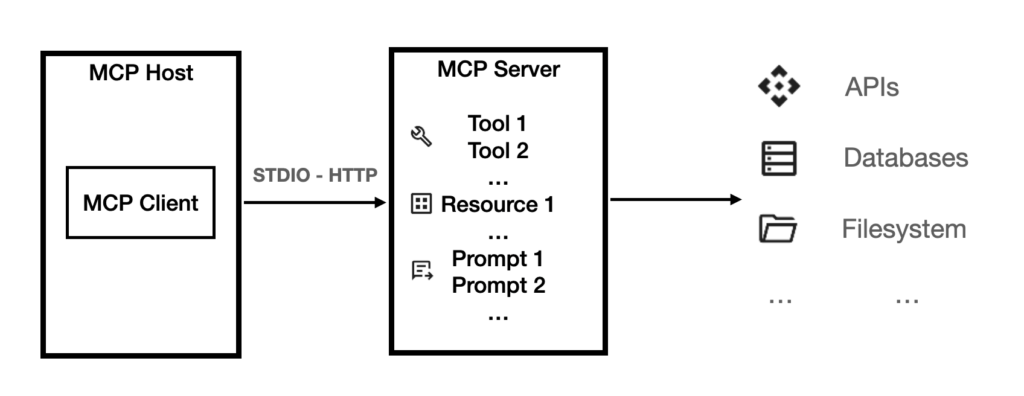
The MCP protocol is structured in two stacked layers. The data layer defines the JSON-RPC 2.0 message format, the connection lifecycle, and the primitives exchanged between clients and servers. The transport layer manages physical communication mechanisms between participants, abstracting these details from the data layer.
MCP supports two transports. The STDIO transport connects client and server via stdin and stdout: the server is a process launched by the host on the same machine, with no network overhead. This is the transport we use in articles 5 through 10 of this series. The Streamable HTTP transport uses HTTP POST for client-to-server requests, with optional Server-Sent Events for real-time notifications. This transport enables remote servers accessible from multiple clients simultaneously. The MCP spec recommends OAuth to secure HTTP exchanges, which we cover in article 12.
The practical difference is simple: an STDIO server serves one client at a time, locally. An HTTP server can serve N clients in parallel from anywhere on the network. That criterion drives transport selection based on use case.
Every MCP connection begins with an initialization handshake. The client sends its protocol version (for example "protocolVersion": "2025-06-18") and its capabilities list. The server responds with its version and capabilities. This negotiation determines which primitives will be available in the session. If versions are incompatible, the connection shuts down cleanly before any data exchange.
In order to quickly understand the way the protocol works, please find below samples of MCP request and response, for a tool invocation (here, the tool called is a currency converter function).
The sample request, invoking the convert_currency tool :
{
   "jsonrpc": "2.0",
   "id": 1,
   "method": "tools/call",
   "params": {
     "name": "convert_currency",
     "arguments": {
       "source": "dollar",
       "target": "euros",
       "amount": 5
     }
   }
}
The corresponding MCP response, providing the result back to your system (the calling LLM) :
{
   "jsonrpc": "2.0",
   "id": 1,
   "result": {
     "content": [
       {
         "type": "text",
         "text": "4.31"
       }
     ],
     "isError": false
   }
}
Note : in 2026, the MCP specification is evolving, check the blog post “MCP 2026-07-28: What Changes for Your AI Agents” for more information.
The three MCP primitives: tools, resources, and prompts
An MCP server can expose three types of objects to the LLM. These primitives define the protocol’s expressiveness: what you can do with an MCP server goes well beyond simple function calls.
Tools are executable functions that the LLM can invoke based on conversation context. This is the most widely used primitive. When Claude determines that a request requires querying a database or calling a weather API, it sends a tools/call message with the tool name and arguments. The server executes the logic, returns the result, and the LLM incorporates that information into its response. Concrete examples: query_database(sql), get_weather(city), create_github_issue(title, body).
The LLM selects which tool to call by reading the metadata the server publishes during discovery (tools/list): the tool name, its natural-language description, and the JSON Schema of its input parameters. The description is a critical design element, because this is the text the model reads to decide whether this tool fits the situation. In article 4 we will see why this field is also a security vector to watch carefully (tool poisoning).
Resources are data sources exposed via URIs. Unlike tools, a resource is not an action: it is content that the host can inject into the LLM’s context without the model needing to actively decide to call it. The URI scheme is free and server-defined: mcp://docs/readme, file:///home/user/config.toml, postgres://db/schema. This pattern suits knowledge bases, configuration files, or reference data that the model needs in context throughout a working session.
Prompts are parameterized templates the server makes available. A server can expose a code_review prompt with parameters language (python/go/typescript) and style (concise/detailed): the user or host instantiates this template to structure the interaction with the LLM. This is useful for encoding recurring workflows or complex instructions that a team wants to standardize without retyping every session.
| Type | Who decides to use it? | Typical use | REST analogy |
|---|---|---|---|
| Tool | The LLM (based on context) | API call, DB query, system action | POST |
| Resource | The host (automatic injection) | Documentation, schema, configuration | GET |
| Prompt | The user or host | Code review template, workflow | GET (template) |
The three primitives combine to create expressive servers. An MCP server for a database can simultaneously expose a query_db tool for dynamic queries, a mcp://db/schema resource with the read-only database schema, and an sql_helper prompt with few-shot query examples. The agent gets a complete interface: structural context, formulation guidance, and action capability on the database.
Why MCP over native function calling or LangChain?
The direct answer: MCP, native function calling, and LangChain are not in direct competition. They operate at different abstraction levels, and understanding their boundaries helps choose the right approach for each context.
Native function calling from LLM APIs (Anthropic, OpenAI, Google) is a request-side mechanism: you declare functions in each API call, and the model decides to invoke one. This mechanism remains tied to each provider. Anthropic’s JSON format differs from OpenAI’s. A tool defined for the Claude API must be adapted for the GPT-4 or Gemini API. The code integrating the LLM and the code implementing the tool stay mixed in the same application.
With MCP, the server (the tool) and the host (the LLM client) are separated by a standard, model-agnostic network protocol. The get_weather server runs over STDIO or HTTP. Claude Desktop calls it via its MCP client. ChatGPT calls it via its own. Both consume the same server without the server knowing or caring which host it is talking to. This separation is structural and durable.
LangChain Tools is a Python framework for organizing tools within LangChain pipelines. It is useful in a LangChain context, but it is Python code: a LangChain Tool cannot be called directly by Claude Desktop without going through your LangChain application. MCP goes further by defining an inter-process communication protocol that any compatible host can use, regardless of the language or framework the server is written in.
OpenAI plugins, launched in March 2023 and discontinued in 2024, had a similar ambition to MCP. But their architecture remained centralized at OpenAI, limited to ChatGPT alone, and adoption stagnated. MCP draws the lessons from that failure: open protocol, public spec at modelcontextprotocol.io, community governance on GitHub, multi-provider adoption from day one.
What makes MCP solid is the combination of three properties none of the previous mechanisms achieved simultaneously: an open standard (the spec is public and free), model-agnostic (Claude, Gemini, GPT-4, and Llama can all be MCP hosts), and network-protocol-based (not a library). Simultaneous adoption by Anthropic, OpenAI, and Microsoft within a year confirms the industry has aligned on this standard. To understand how MCP articulates with A2A, Google’s inter-agent communication protocol, our article A2A and MCP: Essential Protocols for AI Agent Development details the complementarity of the two standards.
FAQ
Does MCP work with all LLMs?
MCP is a host-side protocol: it does not depend on the language model used internally. Any LLM can be integrated into an MCP host. The main hosts that natively support MCP today are Claude Desktop and Claude Code (Anthropic), ChatGPT (OpenAI), VS Code with GitHub Copilot (Microsoft), Cursor, and Continue.dev. If a particular LLM or development tool does not yet support MCP, that is an SDK implementation question, not a protocol limitation.
What is the difference between an MCP server and a REST API?
A REST API exposes HTTP endpoints that your code calls explicitly, with authentication, pagination, and error handling to implement on the client side. An MCP server exposes primitives (tools, resources, prompts) via JSON-RPC 2.0, with a managed connection lifecycle: the client negotiates capabilities at startup, maintains the session, and receives real-time notifications. An MCP server can internally call a REST API to implement its tools: the two mechanisms are complementary, not competing.
Is the MCP spec stable for production use?
MCP has gone through several revisions since November 2024. A major revision is scheduled for July 28, 2026, introducing a stateless architecture for the HTTP transport and formalizing extensions. Our article MCP 2026-07-28: What Changes for Your AI Agents details these changes. Official servers (GitHub, Sentry, Stripe) maintain backward compatibility. For community servers, verify the supported protocol version before integrating.
Can an MCP server be deployed to the cloud?
Yes: that is precisely the role of the Streamable HTTP transport. An HTTP MCP server deploys to any VPS, Railway, Fly.io, or cloud service, and accepts connections from remote hosts. The STDIO transport remains reserved for local servers on the same machine as the host. HTTP deployment is covered in article 11, OAuth authentication in article 12.
Conclusion — what comes next in the MCP-101 series
MCP solves a structural problem: the fragmentation of LLM-tool integrations. Its JSON-RPC 2.0 protocol with three primitives (tools, resources, prompts) and two transports (local STDIO, remote HTTP) creates common ground where tool builders and agent developers can meet without friction. Simultaneous adoption by Anthropic, OpenAI, and Microsoft within a year confirms the industry has found its interoperability standard.
What you have just read is the conceptual layer. The MCP-101 series now moves into practice. Article 2 covers the existing server ecosystem: 15 reference servers by domain, with installation instructions for Claude Desktop. Article 3 presents the available SDKs and frameworks for writing your own server. Article 4 is entirely dedicated to security: tool poisoning, prompt injection, silent exfiltration. Starting with article 5, you write your first STDIO server in Python with FastMCP and test it in Claude Code CLI.
To follow MCP ecosystem news between articles in this series, our MCP and agentic AI press review covers major weekly developments.