

Your First Python MCP STDIO Server
FastMCP (Anthropic’s official SDK) reduces building an MCP server to a handful of Python decorators. In under an hour, you build mcp-travel — two mock tools (get_weather and get_currency) you can test in Claude Desktop, Claude Code CLI and OpenCode without changing a single line of server code. This article lays the foundations; part 6 will connect the real APIs.
- Series: MCP-101 — Part 5 / 12
- Level: Intermediate Python — classes, decorators, async
- Stack: uv · Python 3.12 · FastMCP (official SDK) · Claude Desktop
From Security to Practice
The previous article in this series (part 4) mapped the risks: tool poisoning, silent exfiltration, rug pull. The best way to understand those attack vectors is to write an MCP server yourself — and see exactly what it can do.
This fifth article marks the shift from theory to practice. We will build mcp-travel, a Python MCP STDIO server with two tools: get_weather for destination weather, and get_currency to convert currencies. The returned values will be mocked — hardcoded, with no external network calls. The goal is to master the mechanics of the protocol and FastMCP before introducing the complexity of real APIs, which is the subject of part 6.
The “travel” theme is deliberate: grouping tools by business domain (weather + currencies = travel context) rather than by technology is an MCP design habit that will recur throughout this series. A well-named, well-scoped MCP server is easier to understand, test and maintain.
Estimated time: 30 to 45 minutes for a Python developer comfortable with decorators.
Why FastMCP — and Which One?
Before writing the first line, a clarification is needed: there are two packages called FastMCP, and confusion is common.
The Official Anthropic SDK
from mcp.server.fastmcp import FastMCPThis FastMCP is bundled inside the mcp package maintained by Anthropic (David Soria Parra, Anthropic PBC). Current version: mcp 1.28.1, released June 26 2026. It is available as soon as you install mcp — no extra dependency. Stable, “official”, ideal for getting started.
This is what we use throughout this series.
The jlowin Standalone Package
from fastmcp import FastMCPThis FastMCP is an independent package maintained by Jerrod Linderman (jlowin), the original creator. Current version: v3.4.2. It adds features absent from the official SDK: server composition, proxying, OpenAPI/FastAPI integration. About 70% of production MCP servers use it.
If you are building a production server with advanced requirements, the standalone package is worth exploring. For learning the protocol, the official SDK is more than sufficient and sidesteps provenance questions.
Why Not the Low-Level API?
The Python MCP SDK also exposes a low-level Server class that requires manually handling method handlers, JSON-RPC serialization and the stdin/stdout loop. FastMCP wraps all of that behind decorators. Where the low level takes about fifty lines to expose a single tool, FastMCP does it in five.
Architecture of mcp-travel
Before coding, here is what happens when an MCP host calls a tool:
Claude Desktop (MCP host)
  └─ MCP Client
       └─ STDIO (stdin/stdout)  ──>  server.py  [Python process]
                                        ├─ @mcp.tool  get_weather(city)
                                        └─ @mcp.tool  get_currency(from_currency,
                                                              to_currency, amount)
STDIO means the Python server runs in the background as an ordinary process. The MCP host (Claude Desktop, Claude Code CLI, OpenCode…) starts it at launch, sends messages via stdin, reads responses on stdout. No network port, no external exposure, no HTTP server to manage. The host fully controls the process lifecycle.
This architecture has an important implication for your code: anything written to stdout is intercepted by the MCP protocol. A simple print("debug") corrupts the JSON-RPC messages and crashes the connection. We come back to this in the code section.
mcp-travel exposes two tools in the same process:
get_weather(city)— returns weather conditions for a city (temperature, description, humidity)get_currency(from_currency, to_currency, amount)— converts an amount between two currencies
In this article, both return mocked data. The “travel” business logic justifies grouping them in one server: a travel assistant helping plan a trip naturally needs both.
Setting Up with uv
Two prerequisites: Python 3.10 or higher (3.12 recommended), and uv installed.
# macOS / Linux
curl -LsSf https://astral.sh/uv/install.sh | sh

# Windows (PowerShell)
powershell -ExecutionPolicy ByPass -c "irm https://astral.sh/uv/install.ps1 | iex"
Restart your terminal after installation so the uv command is available.
Create the Project
uv init mcp-travel --python 3.12
cd mcp-travel
uv add "mcp[cli]"
The --python 3.12 flag is essential: it sets both the .python-version file and the requires-python = ">=3.12" field in pyproject.toml. Without it, uv init generates requires-python = ">=3.9" and the resolution of mcp[cli] (which requires Python ≥ 3.10) fails. If Python 3.12 is not yet installed on your machine, uv downloads it automatically.
After uv init, the structure is minimal:
mcp-travel/
  main.py          ← generated by uv (we will replace it with server.py)
  pyproject.toml
  README.md
  .gitignore
  .python-version  ← contains "3.12"
The first uv add or uv run automatically creates .venv/ and uv.lock. No python -m venv, no manual activation.
The [cli] extra installs two useful things beyond the base SDK: mcp dev, the interactive inspector for testing your server without Claude Desktop or another MCP host, and protocol diagnostic tools.
Rename the Main File
uv init generates main.py. Rename it (or create directly) server.py:
# macOS / Linux
mv main.py server.py

# Windows
ren main.py server.py
Check pyproject.toml
[project]
name = "mcp-travel"
version = "0.1.0"
description = "Travel MCP server — weather and currencies"
readme = "README.md"
requires-python = ">=3.12"
dependencies = [
    "mcp[cli]>=1.2.0",
]
Expected final structure:
mcp-travel/
  server.py        ← your code
  pyproject.toml
  uv.lock
  .venv/
  README.md
Writing the Two Tools — get_weather and get_currency
Open server.py and replace its content with the following, section by section.
Import and Instantiation
import json
import sys
from mcp.server.fastmcp import FastMCP

mcp = FastMCP("mcp-travel")
The name passed to FastMCP("mcp-travel") appears in the MCP host interface to identify your server. Choose a readable name.
Why json and sys?
jsonserializes tool responses to JSON strings — the MCP convention for structured returns.sysis needed to write tostderrfor any logging:print("debug", file=sys.stderr). Any write tostdoutcorrupts the protocol.
get_weather
@mcp.tool()
def get_weather(city: str) -> str:
    """Returns current weather conditions for a given city.

    Args:
        city: City name (e.g. 'Paris', 'Tokyo', 'New York')
    """
    # Mock data — Part 6 will call a real weather API
    weather_data = {
        "Paris": {"temperature_c": 18, "conditions": "Cloudy", "humidity_pct": 72},
        "Tokyo": {"temperature_c": 28, "conditions": "Sunny", "humidity_pct": 65},
        "New York": {"temperature_c": 22, "conditions": "Partly cloudy", "humidity_pct": 58},
        "Berlin": {"temperature_c": 15, "conditions": "Rainy", "humidity_pct": 85},
        "Reykjavik": {"temperature_c": 4, "conditions": "Windy", "humidity_pct": 80},
    }

    data = weather_data.get(city, {
        "temperature_c": 20,
        "conditions": "No data available for this city",
        "humidity_pct": 60,
    })

    return json.dumps({"city": city, **data}, ensure_ascii=False)
Three key points:
Type annotations are mandatory. FastMCP reads city: str to generate the tool’s JSON Schema. Without annotations, the schema is incomplete and Claude cannot build the arguments — the tool will be ignored or produce an error.
The docstring is the LLM’s interface. Claude reads the tool description and each parameter’s docstring to decide when to call get_weather and what to pass it. A vague docstring means a misused tool.
Return a JSON string, not a dict. MCP tools return text. json.dumps() properly serializes the response and Claude can interpret it as a data structure in its natural reply.
get_currency
@mcp.tool()
def get_currency(from_currency: str, to_currency: str, amount: float = 1.0) -> str:
    """Converts an amount from one currency to another.

    Args:
        from_currency: ISO code of the source currency (e.g. 'EUR', 'USD', 'GBP', 'JPY')
        to_currency: ISO code of the target currency
        amount: Amount to convert (default: 1.0)
    """
    # Realistic mock rates (approximate July 2026)
    rates = {
        ("EUR", "USD"): 1.08,
        ("EUR", "GBP"): 0.84,
        ("EUR", "JPY"): 163.0,
        ("USD", "EUR"): 0.93,
        ("USD", "GBP"): 0.78,
        ("USD", "JPY"): 151.0,
        ("GBP", "EUR"): 1.19,
        ("GBP", "USD"): 1.28,
        ("GBP", "JPY"): 194.0,
        ("JPY", "EUR"): 0.0061,
        ("JPY", "USD"): 0.0066,
        ("JPY", "GBP"): 0.0052,
    }

    if from_currency == to_currency:
        return json.dumps({
            "from": from_currency,
            "to": to_currency,
            "amount": amount,
            "converted": amount,
            "rate": 1.0,
        })

    rate = rates.get((from_currency, to_currency))
    if rate is None:
        return json.dumps({"error": f"Rate {from_currency}/{to_currency} not available"})

    converted = round(amount * rate, 2)
    return json.dumps({
        "from": from_currency,
        "to": to_currency,
        "amount": amount,
        "converted": converted,
        "rate": rate,
    })
The amount: float = 1.0 parameter illustrates FastMCP default values: Claude can call get_currency("EUR", "JPY") without specifying an amount and gets the unit rate.
Entry Point
if __name__ == "__main__":
    mcp.run(transport="stdio")
mcp.run(transport="stdio") starts the read/write loop on stdin/stdout. transport="stdio" is explicit here — FastMCP can also handle streamable HTTP (part 11), so we avoid ambiguity.
Complete File
Here is the complete server.py:
import json
import sys  # for print(..., file=sys.stderr) in debug logs
from mcp.server.fastmcp import FastMCP

mcp = FastMCP("mcp-travel")


@mcp.tool()
def get_weather(city: str) -> str:
    """Returns current weather conditions for a given city.

    Args:
        city: City name (e.g. 'Paris', 'Tokyo', 'New York')
    """
    weather_data = {
        "Paris": {"temperature_c": 18, "conditions": "Cloudy", "humidity_pct": 72},
        "Tokyo": {"temperature_c": 28, "conditions": "Sunny", "humidity_pct": 65},
        "New York": {"temperature_c": 22, "conditions": "Partly cloudy", "humidity_pct": 58},
        "Berlin": {"temperature_c": 15, "conditions": "Rainy", "humidity_pct": 85},
        "Reykjavik": {"temperature_c": 4, "conditions": "Windy", "humidity_pct": 80},
    }

    data = weather_data.get(city, {
        "temperature_c": 20,
        "conditions": "No data available for this city",
        "humidity_pct": 60,
    })

    return json.dumps({"city": city, **data}, ensure_ascii=False)


@mcp.tool()
def get_currency(from_currency: str, to_currency: str, amount: float = 1.0) -> str:
    """Converts an amount from one currency to another.

    Args:
        from_currency: ISO code of the source currency (e.g. 'EUR', 'USD', 'GBP', 'JPY')
        to_currency: ISO code of the target currency
        amount: Amount to convert (default: 1.0)
    """
    rates = {
        ("EUR", "USD"): 1.08,
        ("EUR", "GBP"): 0.84,
        ("EUR", "JPY"): 163.0,
        ("USD", "EUR"): 0.93,
        ("USD", "GBP"): 0.78,
        ("USD", "JPY"): 151.0,
        ("GBP", "EUR"): 1.19,
        ("GBP", "USD"): 1.28,
        ("GBP", "JPY"): 194.0,
        ("JPY", "EUR"): 0.0061,
        ("JPY", "USD"): 0.0066,
        ("JPY", "GBP"): 0.0052,
    }

    if from_currency == to_currency:
        return json.dumps({
            "from": from_currency,
            "to": to_currency,
            "amount": amount,
            "converted": amount,
            "rate": 1.0,
        })

    rate = rates.get((from_currency, to_currency))
    if rate is None:
        return json.dumps({"error": f"Rate {from_currency}/{to_currency} not available"})

    converted = round(amount * rate, 2)
    return json.dumps({
        "from": from_currency,
        "to": to_currency,
        "amount": amount,
        "converted": converted,
        "rate": rate,
    })


if __name__ == "__main__":
    mcp.run(transport="stdio")
Verify the server starts without errors:
uv run python server.pyThe process stays in a waiting state (reading stdin). Use Ctrl+C to stop it.
Testing with the mcp dev Inspector (Optional — Requires Node.js)
mcp dev launches the MCP Inspector, a web interface that lists available tools and lets you call them manually. It requires Node.js (and therefore npx).
# Install Node.js if missing (macOS)
brew install node

# Launch the inspector
uv run mcp dev server.py
# → opens http://localhost:5173 in the browser
If Node.js is not installed, skip this step: Claude Desktop provides the same validation and the next section is sufficient to confirm the server works.
Configuring Claude Desktop and Testing
Locating the Configuration File
Claude Desktop reads its MCP configuration from a JSON file:
| OS | Location |
|---|---|
| macOS | ~/Library/Application Support/Claude/claude_desktop_config.json |
| Windows | %APPDATA%\Claude\claude_desktop_config.json |
Create the file if it does not exist yet. Open it and add:
{
  "mcpServers": {
    "mcp-travel": {
      "command": "uv",
      "args": [
        "--directory",
        "/absolute/path/to/mcp-travel",
        "run",
        "server.py"
      ]
    }
  }
}
Critical points:
- The path must be absolute (no
~, no relative path). On macOS/Linux: runpwdinside the project directory. - The order in
argsis--directory <path> run <file>—--directorymust come beforerun. - The
mcpServersblock must be at the root of the JSON file — not nested inside a"preferences"key or any other key. - On some systems,
uvis not in the PATH used by Claude Desktop. If the server does not connect, replace"command": "uv"with the full path:which uv(macOS/Linux) orwhere uv(Windows).
Restart and Verify
Fully quit Claude Desktop and relaunch it. If the configuration is correct, an MCP icon appears in the interface.
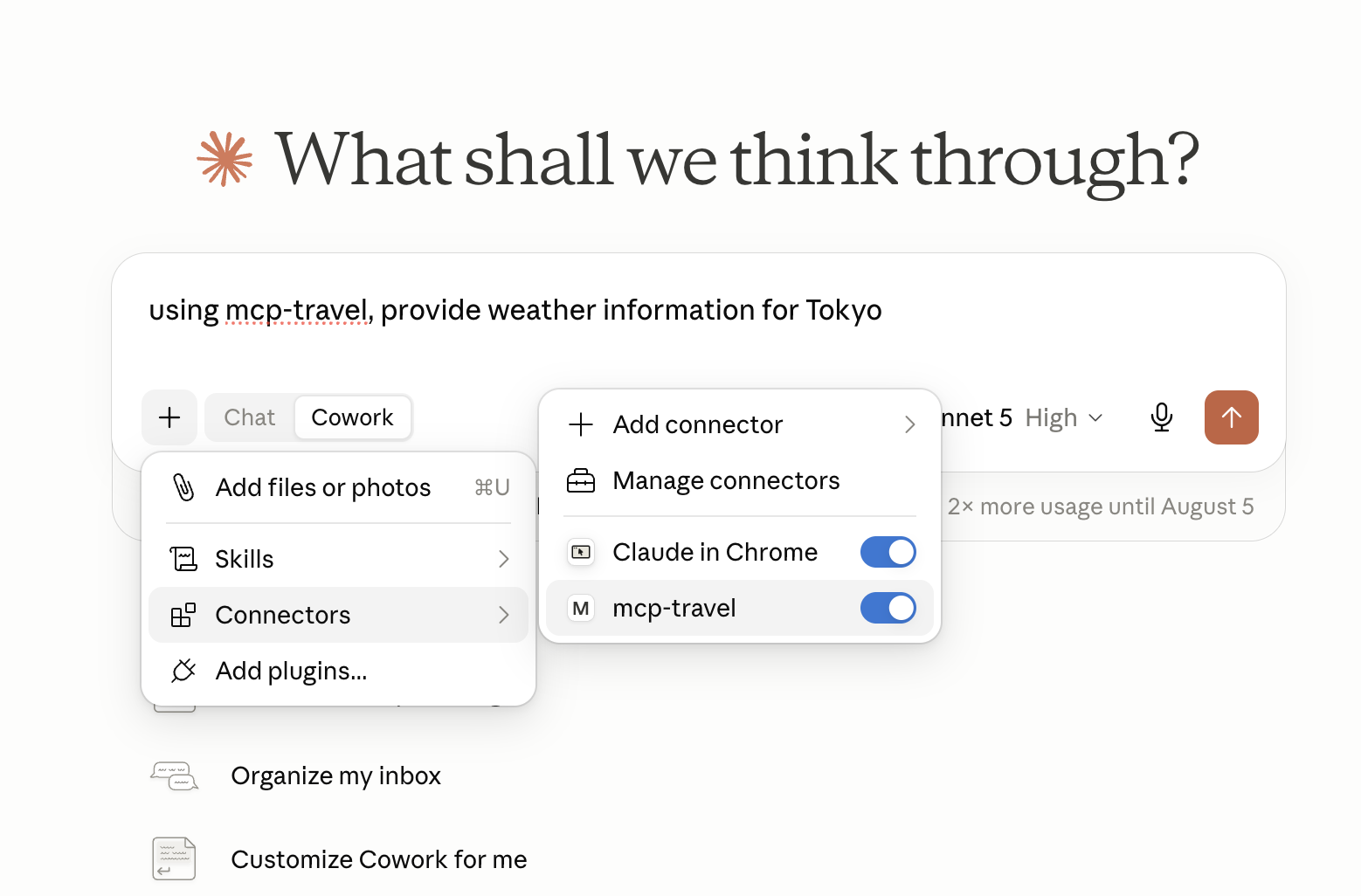
Make sure the MCP server mcp-travel is present and enabled.
Testing with a Realistic Prompt
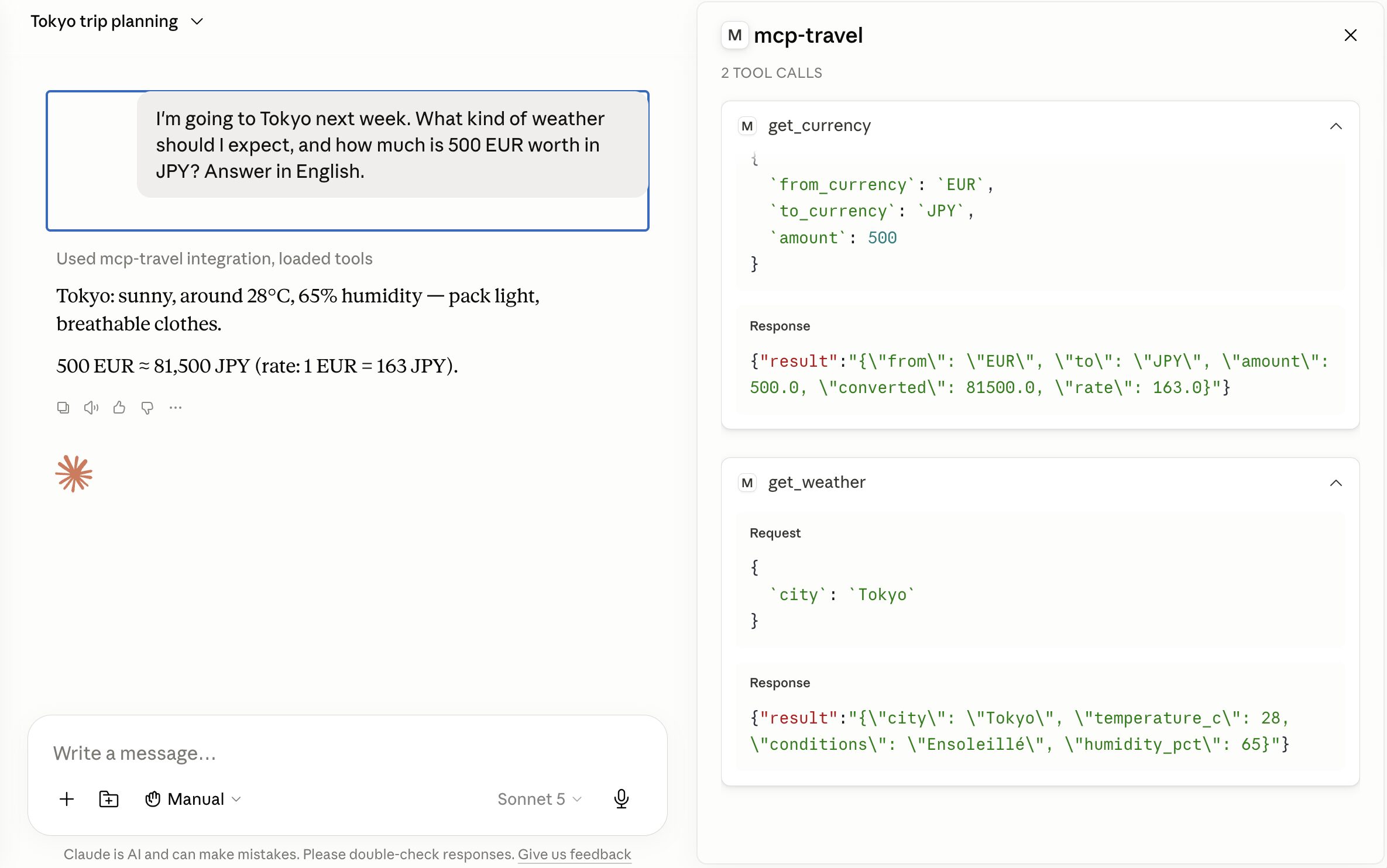
I'm going to Tokyo next week. What kind of weather should I expect,
and how much is 500 EUR worth in JPY?
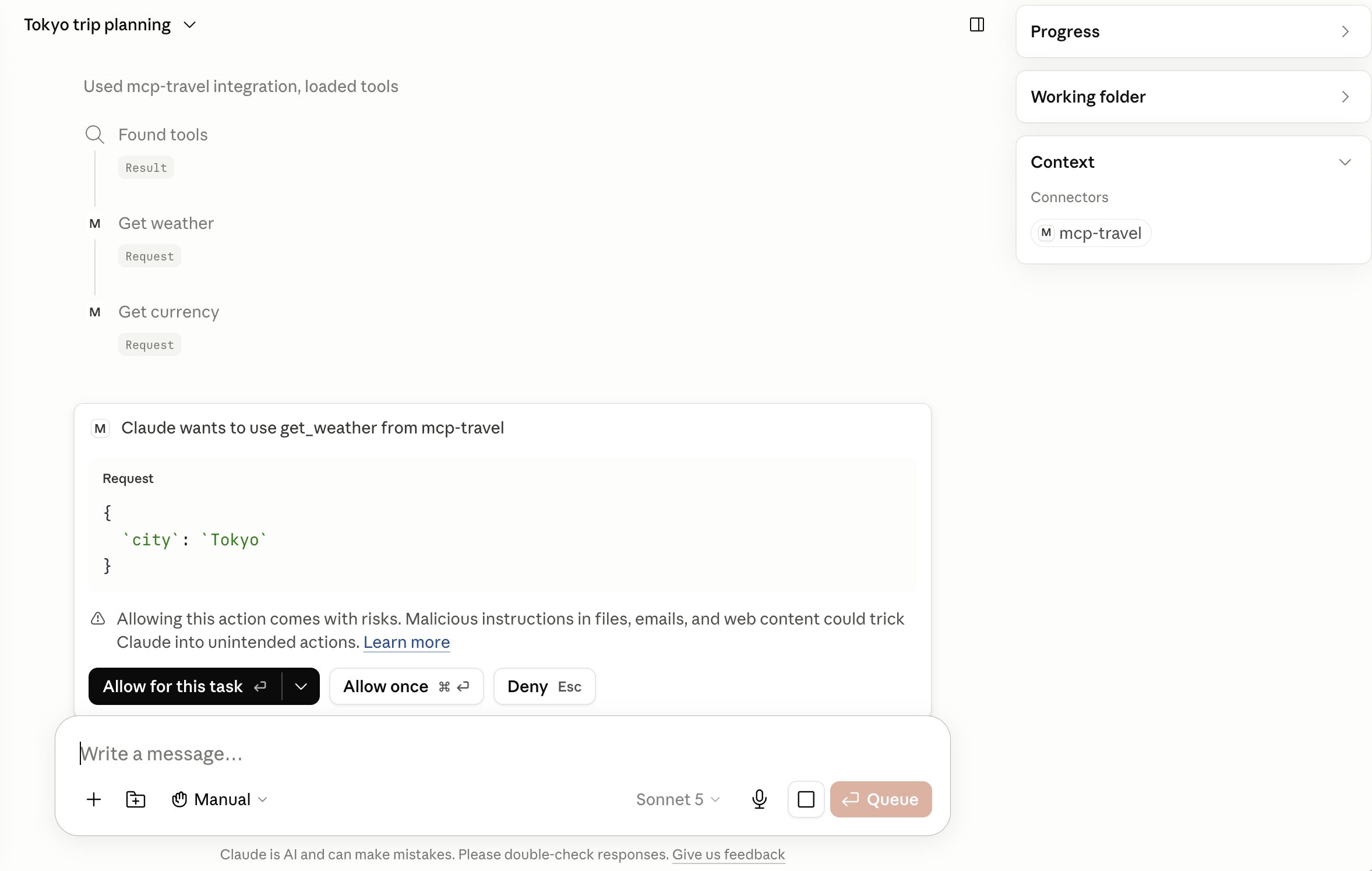
Claude should call get_weather("Tokyo") and get_currency("EUR", "JPY", 500) in the same response, then formulate a natural reply from both results. By default, tool calls trigger an authorization request.
Example response below. Note, on the right in the context panel, the detail of the MCP calls:
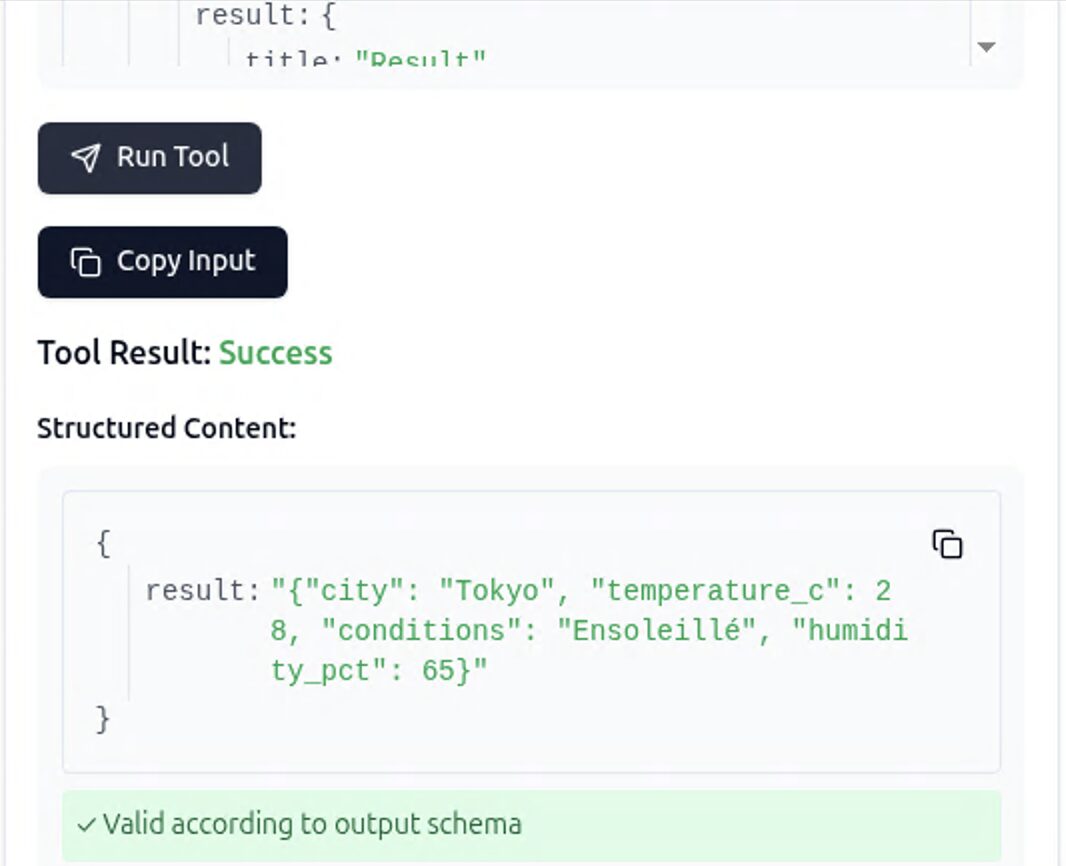
Using the MCP Inspector
The MCP Inspector is part of the SDK and lets you test your servers interactively:
cd mcp-travel
uv run mcp dev server.py
The inspector opens a web interface (typically http://localhost:5173) that lists your tools and lets you call them manually with JSON.
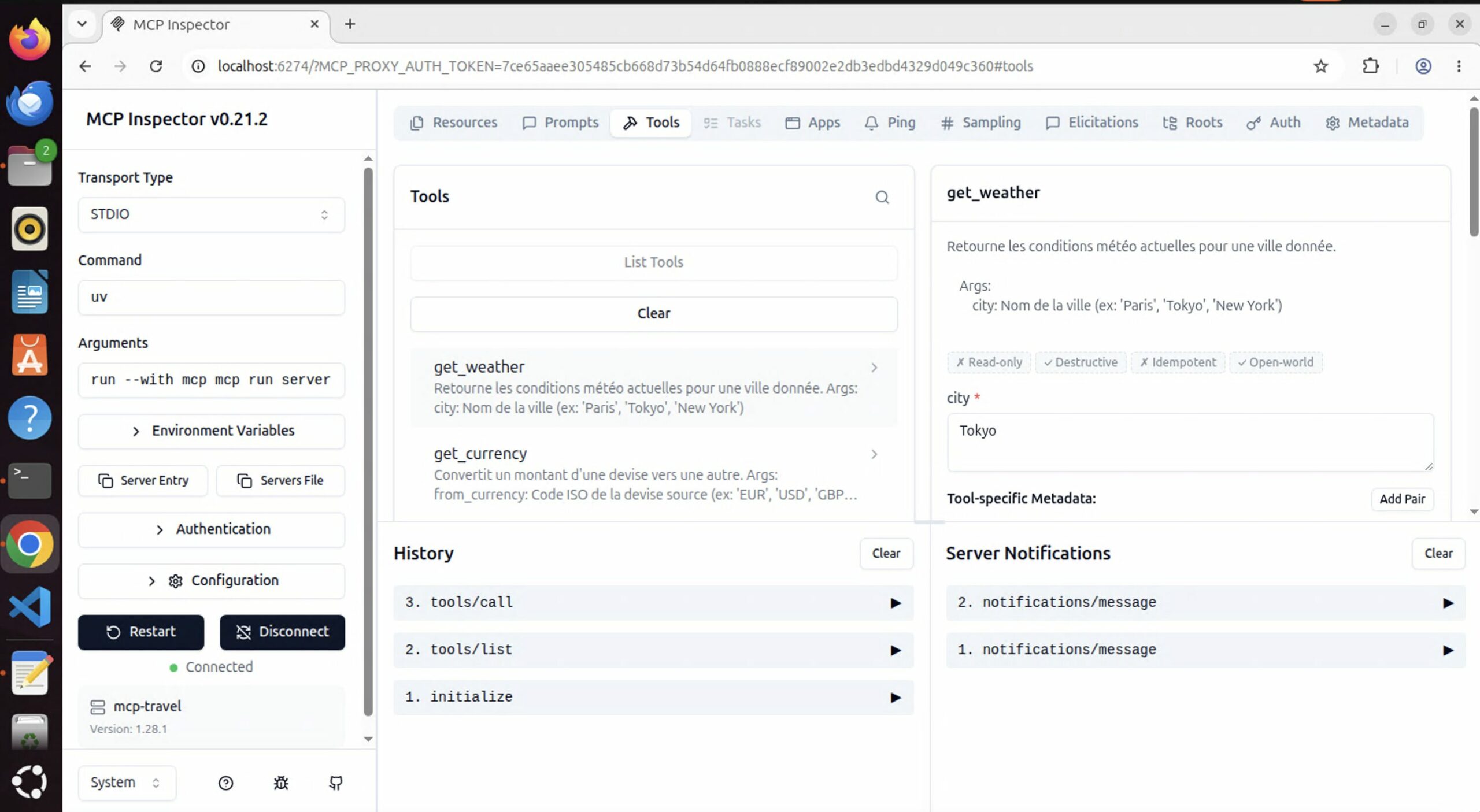
Below, an example of a manual tool call from the inspector interface:
Common Issues
| Symptom | Likely cause | Solution |
|---|---|---|
| Server missing in Claude Desktop | Non-absolute path or uv not in PATH | Use full path from which uv |
| Tool visible but error on call | Print to stdout in the code | Replace with print(..., file=sys.stderr) |
| Slow server startup | First uv run creates the venv | Normal, 5-10 sec on first launch |
| Tool not called by the host | Docstring too vague | Refine the description and Args, force the call in the prompt |
mcp-travel in Other MCP Hosts
With MCP, the same server works in any compatible host without changing a line of code. Here is how to connect mcp-travel to two other environments.
Claude Code CLI
From a terminal where Claude Code is installed:
claude mcp add mcp-travel -- uv --directory /absolute/path/to/mcp-travel run server.pyVerify the configuration:
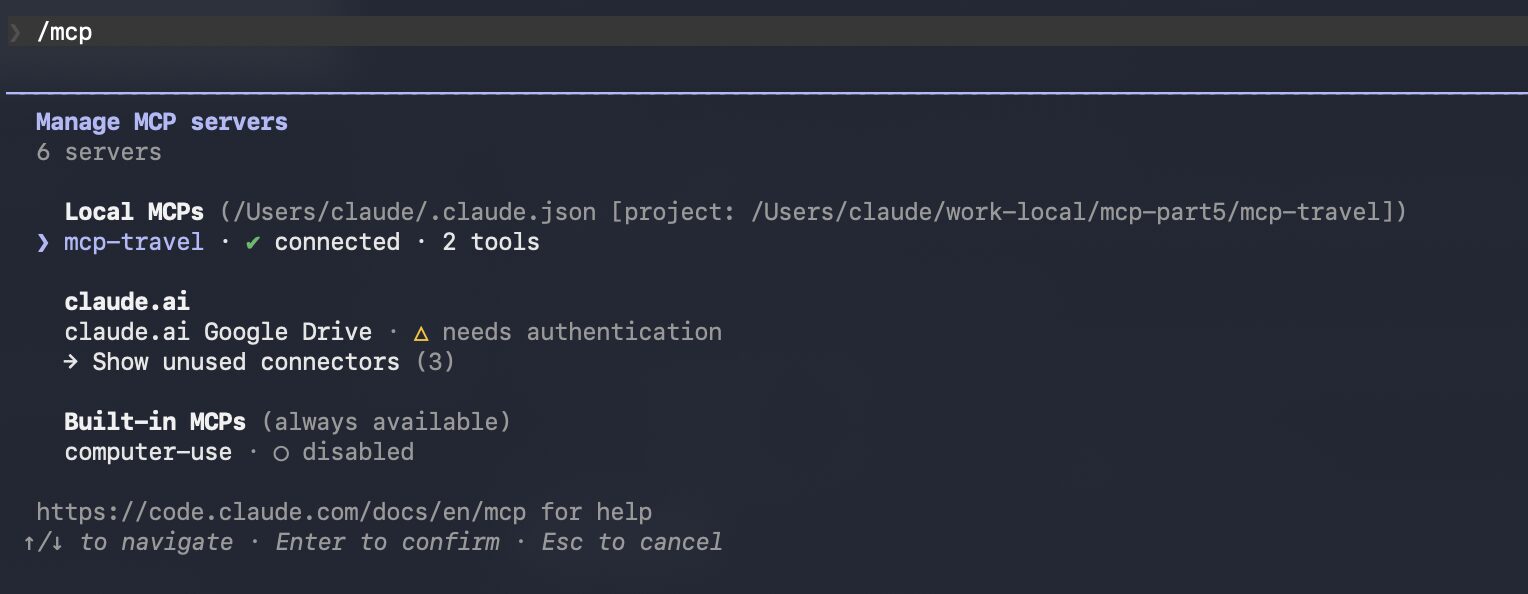
claude mcp listIn a Claude Code session (claude in the terminal), type /mcp to list available servers and their tools. You should see mcp-travel with get_weather and get_currency.
Test directly in the terminal:
using mcp-travel, provide weather information for ReykjavikExample authorization request in Claude Code:
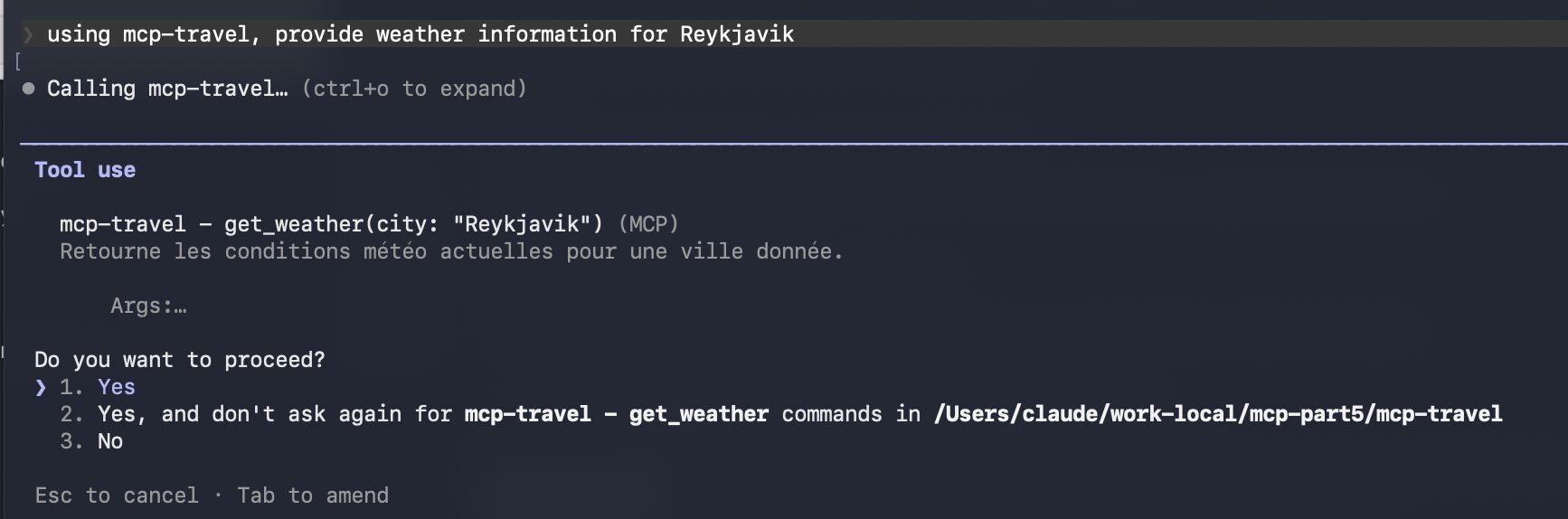
After authorization, Claude calls the tool and integrates the results into its response — same behavior as in Claude Desktop, same server code.
OpenCode
For OpenCode, refer to your version’s documentation for the configuration file location. On macOS, the file is ~/.config/opencode/config.json. Here is the MCP configuration fragment:
{
  "mcp": {
    "mcp-travel": {
      "type": "local",
      "command": ["/usr/local/bin/uv", "--directory", "/absolute/path/to/mcp-travel", "run", "server.py"],
      "enabled": true,
      "args": []
    }
  }
}
After restarting, OpenCode displays the loaded MCP servers and you can test tool invocation:
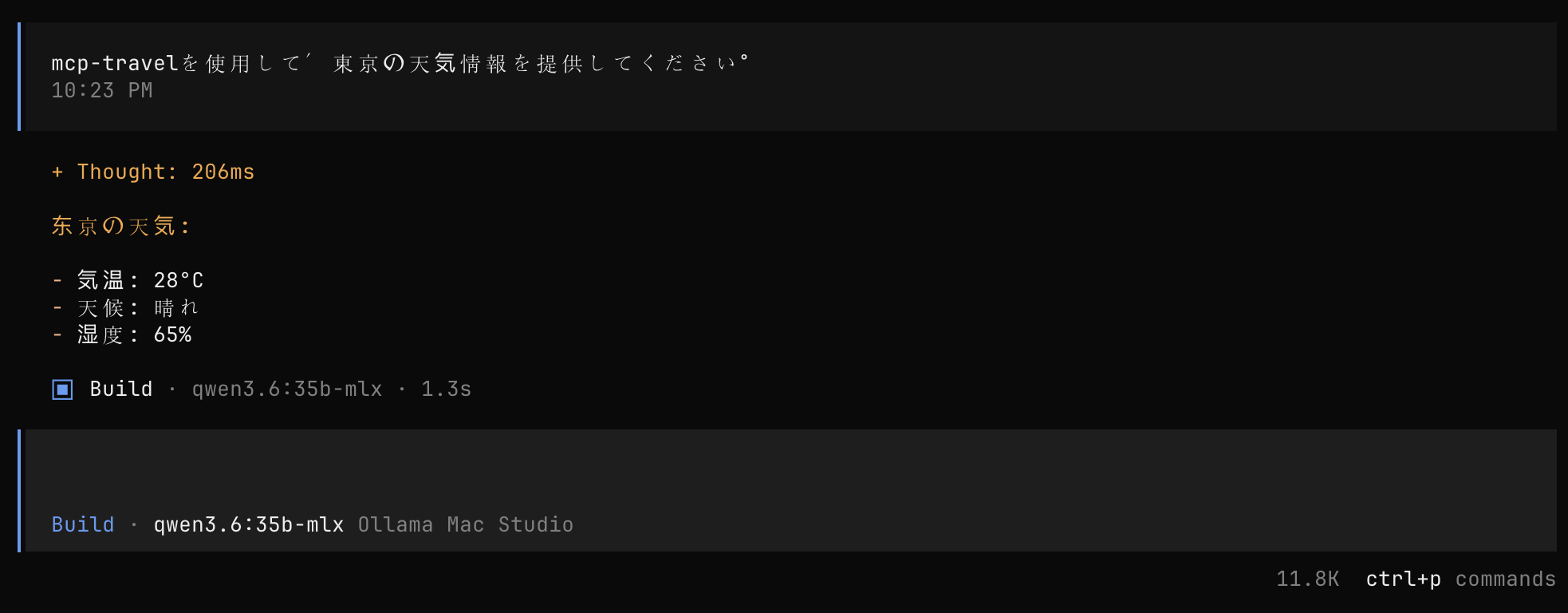
Using mcp-travel, provide weather information for Tokyo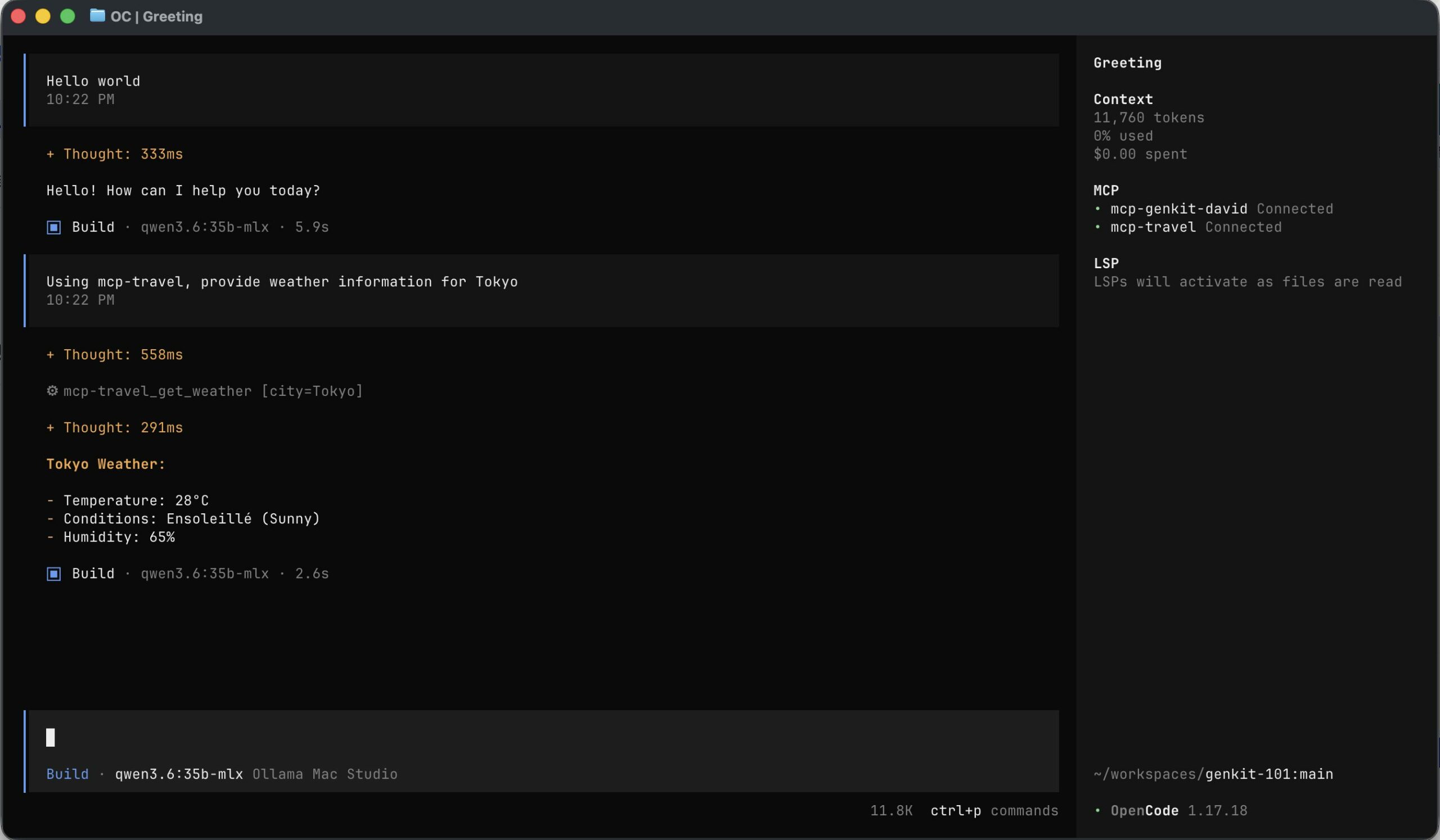
Our server.py has not changed: no code adaptation needed, the MCP protocol ensures interoperability. Only the JSON config file for each host differs.
Below, the same prompt in Japanese:
FAQ
Why start with STDIO rather than HTTP?
STDIO is the simplest transport: the server runs on the same machine as the host, no network port to expose, no TLS, no session management. The host starts and stops the process automatically. For a first server, it is the fastest path to a working result. The streamable HTTP transport (part 11) allows exposing an MCP server remotely, accessible from multiple clients simultaneously — and the tool code does not change between the two transports.
How can I see the JSON messages exchanged between Claude and my server?
Three approaches: mcp dev server.py displays all MCP messages (requests and responses) in real time in a web interface; from the server code, anything you write to stderr appears in the host logs (print("received city=", city, file=sys.stderr)); Claude Desktop logs MCP exchanges in its log files (macOS: ~/Library/Logs/Claude/).
Are type annotations really mandatory?
Yes, for FastMCP. Without city: str, FastMCP generates an incomplete JSON Schema — the city field will be missing or have no type. Claude cannot build the arguments and the tool will be either ignored or called with errors. With mcp dev, you can inspect the generated schema for each tool: a tool without annotations produces "properties": {}, an empty schema that results in an unusable tool.
Mocks Validated, On to Real APIs
You have built a functional MCP STDIO server, integrated into three different hosts without changing a line of server code. In this part, we covered:
- FastMCP mechanics: decorators, type annotations, docstrings as the LLM’s interface
- The STDIO protocol: Python process in the background, stdin/stdout, stderr for logs
- Domain-driven design: grouping
get_weatherandget_currencyinmcp-travelbecause they serve the same use case - Host-by-host configuration: same or very similar JSON
argsanduvcommand, regardless of the target
Part 6 picks up the tools from this first server — same name, same function signatures, same tool names. We will replace the internal implementation: get_weather will call wttr.in, get_currency will query a public exchange rate API. We add network error handling, timeouts, and API keys via environment variables.
The interface/implementation separation in MCP is not just good Python practice. It is what allows Claude Desktop, Claude Code CLI and OpenCode to keep using mcp-travel without reconfiguration when we plug in real data in part 6.
Next article: MCP-101 Part 6 — MCP Tools with Internet Access — Weather and Currencies (coming soon)