MCP Servers: some examples
TL;DR: Since November 2024, the MCP ecosystem has grown to over 16,000 servers published by GitHub, MongoDB, Atlassian, Stripe, AWS, and hundreds of open-source contributors. This guide covers 18 reference servers across six domains, walks through how to declare them in Claude Desktop and Gemini CLI, and gives you the criteria to evaluate a community server before running it on your machine.
- Series: MCP-101 — Part 2 / 12
- Level: Intermediate Python — classes, decorators, async
- Stack: uv · Python 3.12 · FastMCP · Go 1.22+ · Docker · Claude Desktop · Claude Code CLI
The MCP ecosystem in 2025-2026: unprecedented growth
When Anthropic released the Model Context Protocol in November 2024, the official modelcontextprotocol/servers repository held about fifteen demonstration servers. Within weeks, companies like GitHub, Stripe, and Atlassian had shipped their own implementations. Within months, the ecosystem had crossed 16,000 referenced servers. No other AI integration protocol had seen adoption this fast since webhooks.
The reason is straightforward. MCP solves a problem every developer hits the moment they start building AI agents. Without a common standard, connecting an LLM to GitHub means writing glue code specific to the GitHub API and the LLM API. Then repeating the exercise for Jira, for Postgres, for S3. MCP standardizes that interface once: a well-written MCP server works with Claude, with Gemini CLI, with Continue.dev, with Cursor, and with any other MCP-compliant client. The business case for a vendor like Atlassian to build an official MCP server is obvious: one integration effort reaches every MCP client at once.
In Part 1 of this series, I covered the fundamentals of MCP: the JSON-RPC 2.0 protocol, the three primitives (tools, resources, prompts), and the two transports (STDIO and Streamable HTTP). This article is practical: which servers to install first, how to declare them in your clients, and how to assess a community server before trusting it.
Before diving in, three categories I use throughout this article:
- Official — vendor: maintained by the company that makes the product. The GitHub MCP Server is built and maintained by GitHub Inc. Support and update guarantees come directly from the vendor.
- Anthropic reference: published in the
modelcontextprotocol/serversrepository. The code is auditable and maintained by Anthropic and its contributors, but the service being exposed is not an Anthropic product (Postgres, Brave Search, etc.). - Community: everything else. Can be excellent, but requires a review before installation.
What are the essential MCP servers by domain?
The 18 servers below cover the six most common integration categories. For each: type, one-line use case, and a link to the reference repository.
SCM and code management
| Server | Type | Use case | Repo |
|---|---|---|---|
| GitHub MCP Server | Official — GitHub | Manage repos, PRs, issues, code search, and GitHub Actions in plain language | github/github-mcp-server |
| GitLab MCP | Community | GitLab repos, merge requests, and CI/CD pipelines in natural language | gitlab-mcp (multiple active forks) |
The GitHub MCP Server is the canonical example of a production-quality official server: published by GitHub Inc. in 2025, it exposes the complete GitHub API (repos, issues, PRs, code search, Actions) as MCP tools. It runs via npx @github/github-mcp-server and requires a GitHub Personal Access Token in the environment variables. If your workflow runs through GitHub, this is the first server to install and a useful quality benchmark when evaluating community servers.
Databases
| Server | Type | Use case | Repo |
|---|---|---|---|
| Postgres MCP | Anthropic reference | Natural language SQL queries and schema inspection on PostgreSQL | modelcontextprotocol/servers |
| MongoDB MCP | Official — MongoDB | NoSQL queries, collection and index management, Atlas integration | mongodb-js/mongodb-mcp-server |
| Redis MCP | Official — Redis | Read, write, and analyze Redis data in natural language | Redis docs |
The Postgres MCP was one of the first servers in the Anthropic reference repository. It exposes a query tool (read-only SQL execution) and list_schemas (schema inspection). Read-only by default: the server refuses write queries unless explicitly configured otherwise. The MongoDB MCP, published by MongoDB Inc., is broader in scope: reads and writes, index management, connection string passed as an environment variable. These two servers illustrate clearly the difference in scope between a generic reference server and a vendor-maintained one.
Productivity and project management
| Server | Type | Use case | Repo |
|---|---|---|---|
| Google Drive MCP | Anthropic reference | Read and search Drive, Docs, and Sheets in natural language | modelcontextprotocol/servers |
| Jira MCP | Official — Atlassian | Create and update issues, manage backlogs and sprints | atlassian/atlassian-mcp-server |
| Notion MCP | Official — Notion | Read and update Notion pages and databases in natural language | makenotion/notion-mcp-server |
| Linear MCP | Community | Linear ticket management, cycles, and project tracking | linear-mcp (several community implementations) |
The Jira and Notion servers illustrate a pattern that emerged clearly in 2025: SaaS vendors publishing official MCP servers as a way to deliver a natural language interface to their users without modifying their core product. Atlassian published atlassian/atlassian-mcp-server covering both Jira and Confluence. Notion followed with makenotion/notion-mcp-server. Linear is a different story: no official Linear Inc. server yet, but several well-maintained community implementations with hundreds of GitHub stars. This is exactly the type of server that deserves a code review before installation.
Web and search
| Server | Type | Use case | Package / Repo |
|---|---|---|---|
| Brave Search MCP | Anthropic reference | Web search via the Brave API, no tracking, structured JSON results | modelcontextprotocol/servers |
| Fetch MCP | Anthropic reference | Fetch web pages, convert HTML to Markdown, extract structured content | mcp-server-fetch (modelcontextprotocol/servers) |
| Puppeteer MCP | Anthropic reference | Headless Chromium browser navigation, screenshots, scraping of SPAs | modelcontextprotocol/servers |
| Playwright MCP | Official — Microsoft | Multi-browser automation (Chromium, Firefox, WebKit), screenshots, advanced testing and scraping | microsoft/playwright-mcp |
The Fetch server deserves a dedicated security note, even though its code comes from the official Anthropic repository. The server code itself is clean and auditable. The risk comes from the content it returns. When the LLM calls Fetch on a URL, the content of the fetched page becomes part of the LLM’s context window. A malicious page can contain text designed to manipulate the agent: hidden instructions in invisible HTML elements or white-on-white text blocks. This is not a flaw in Fetch’s code — it is a risk inherent to any server that returns unfiltered third-party content, known as prompt injection via retrieved content. Article 4 of this series covers this attack vector in detail.
The Playwright MCP, published by Microsoft, is the multi-browser alternative to Puppeteer. Where Puppeteer drives only headless Chromium, Playwright supports Chromium, Firefox, and WebKit from a single server. It exposes browser state as MCP resources and handles more complex scenarios: multi-tab applications, sites that detect and block Puppeteer, or workflows requiring cross-browser validation. For straightforward web content retrieval, Fetch MCP is lighter. If you need JavaScript execution, user interaction simulation, or multi-browser coverage, Playwright MCP is the right tool.
DevOps and infrastructure
| Server | Type | Use case | Repo |
|---|---|---|---|
| Docker MCP | Official — Docker | Manage containers, images, volumes, and networks in natural language | Docker MCP Catalog |
| Kubernetes MCP | Community | Manage Kubernetes clusters, pods, deployments, and services | containers/kubernetes-mcp-server |
| AWS MCP | Official — AWS | Inspect and manage AWS resources: S3, Lambda, RDS, DynamoDB, CloudWatch | awslabs/mcp |
| Cloudflare MCP | Official — Cloudflare | Manage Workers, KV stores, DNS records, and zone configuration | developers.cloudflare.com |
AWS Labs published awslabs/mcp as a meta-repository that actually contains around twenty distinct MCP servers, one per major AWS service (Aurora, DynamoDB, ElastiCache, Redshift, S3…). This is a common pattern for large vendors: an umbrella repo with per-service subfolders rather than a single monolithic server. The Kubernetes MCP server published under the containers project is widely deployed in enterprise environments and well maintained, but its write access to clusters deserves careful consideration before production use. Cloudflare exposes infrastructure management capabilities (Workers, KV, DNS) and belongs squarely in the DevOps category.
Finance and market data
| Server | Type | Use case | Repo |
|---|---|---|---|
| Stripe MCP | Official — Stripe | Billing queries, transaction debugging, customer and subscription management | docs.stripe.com/mcp |
| Polygon.io MCP | Community | Stock market data, financial history, tickers, and aggregated OHLCV in natural language | polygon-mcp (community implementations) |
Stripe integrated its MCP server directly into its official documentation at docs.stripe.com/mcp, the strongest possible signal of vendor commitment. The typical use case: a technical support agent that can look up a customer’s transaction history, identify a failed payment, and diagnose its root cause in plain English, without touching the Stripe dashboard. The Polygon.io community server exposes market data, stock tickers, and historical OHLCV data — a useful building block for financial analytics workflows. As a community server, review the code before connecting it to a live trading environment.
How do you declare an MCP server in Claude Desktop?
Claude Desktop is the most widely used MCP host for daily non-developer workflows. Its configuration lives in a single JSON file: claude_desktop_config.json. On macOS, the path is ~/Library/Application Support/Claude/. On Windows, %APPDATA%\\Claude\\. The easiest way to open it: from Claude Desktop, go to Settings > Developer > Edit Config. The file opens in your default editor and is created automatically if it does not exist yet.
Here is a complete example with two servers declared — GitHub MCP (via npx) and Fetch MCP (via uvx):
{
  "mcpServers": {
    "github": {
      "command": "npx",
      "args": ["-y", "@github/github-mcp-server"],
      "env": {
        "GITHUB_PERSONAL_ACCESS_TOKEN": "ghp_YourTokenHere"
      }
    },
    "fetch": {
      "command": "uvx",
      "args": ["mcp-server-fetch"]
    }
  }
}
Each key under mcpServers is the name you assign to the server — a free label that appears in the Claude Desktop interface. Under each server entry:
command: the command Claude Desktop executes to start the server process. For STDIO transport, Claude Desktop launches this process, sends messages on stdin, and reads responses on stdout.args: array of arguments passed to the command. The-yflag with npx auto-accepts the install prompt without interactive confirmation.env: environment variables injected into the server process only. This is the right place for API keys: not in the code, not in system logs, not in the global PATH.
Save the file, then restart Claude Desktop. The configured servers appear in the interface with a connection indicator. Claude can then call their tools directly from a conversation.
To declare the same servers via Claude Code CLI:
# GitHub server (local scope = stored in .claude/settings.local.json, gitignored)
claude mcp add --scope local github -- \
  npx -y @github/github-mcp-server \
  --env GITHUB_PERSONAL_ACCESS_TOKEN=ghp_YourToken

# Fetch server (no API key required)
claude mcp add --scope local fetch -- uvx mcp-server-fetch
--scope local stores the configuration in .claude/settings.local.json, which is gitignored automatically and persists across all Claude Code sessions on that machine. --scope project commits the config to .claude/settings.json to share it with your team. --scope user stores it in ~/.claude.json and applies it across all your projects. Run claude mcp list to verify which servers are registered for the current session.
Warning: uvx and npx download and execute code at runtime
When your config contains "command": "uvx" or "command": "npx", Claude Desktop downloads the package from PyPI or npm on every server start and executes it with your user account’s permissions. You are not reading the code before running it. A package with a name close to an official one can be malicious: mcp-server-fetsh (typo) or githab-mcp (homoglyph) are examples of typosquatting names that attackers could publish on PyPI or npm. Before adding any package via uvx or npx:
- Verify the exact package name in the official GitHub repository’s README
- Check the publisher on the PyPI or npm page: the Project URLs field must point to the correct GitHub repo
- Look at the package creation date: a package created two weeks ago with three downloads is a red flag
The full attack vectors associated with uvx and npx are covered in Article 4 of this series.
Example: Claude Desktop / Fetch
A first hands-on illustration using the Fetch MCP server in Claude Desktop on macOS. Claude Desktop and Claude Code already include a built-in tool capable of accessing web pages — more capable than the Fetch server shown here — but this example is about demonstrating:
- how to declare an MCP server in Claude Desktop
- how to invoke it from a prompt
- the permission system in action
First step: this is a STDIO server, so you need to install it locally and declare it in Claude Desktop (macOS example with brew):
brew install uv
uvx mcp-server-fetch --help
The configuration uses one of the examples shown earlier in this article:
{
   "mcpServers": {
     "fetch": {
       "command": "uvx",
       "args": [
         "mcp-server-fetch"
       ]
     }
   }
}
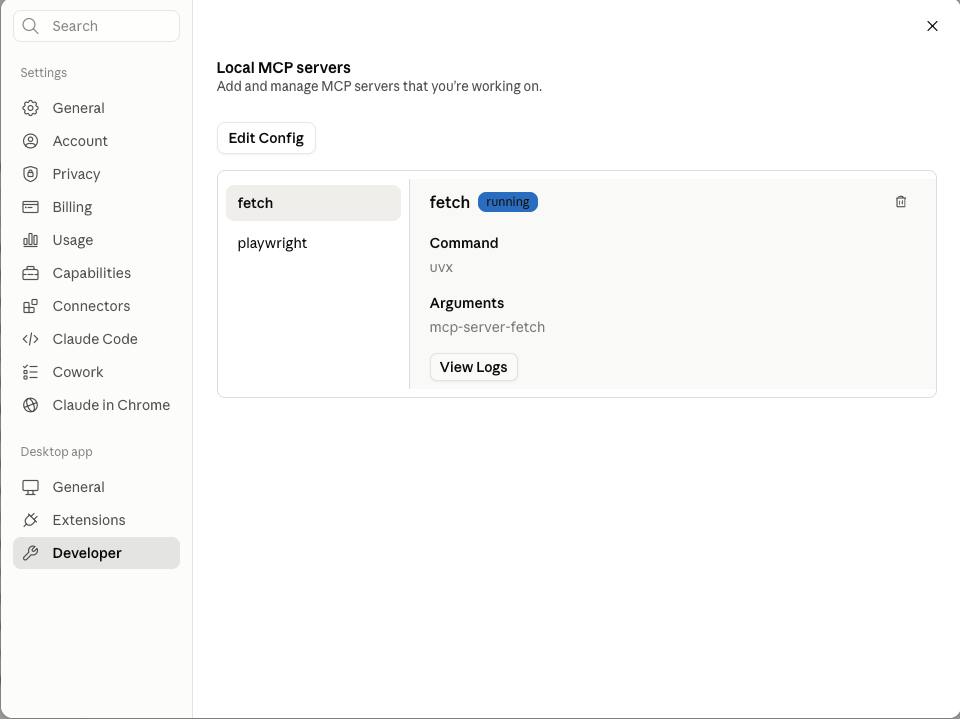
You will need to quit and relaunch Claude Desktop for the server to be picked up.
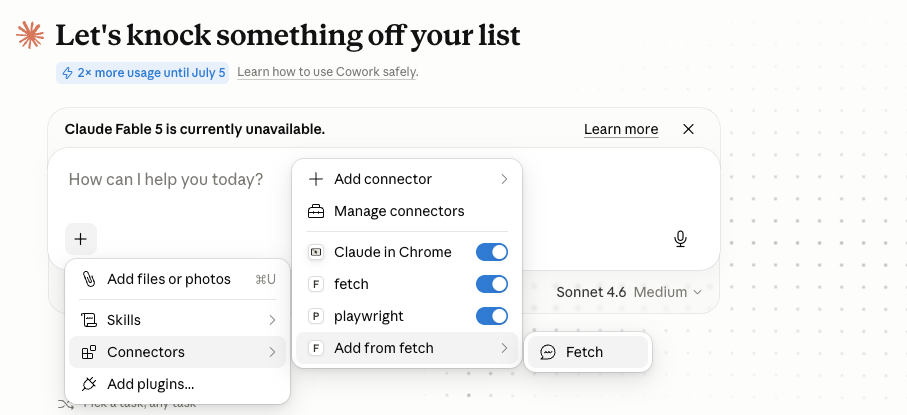
The server appears in the application settings/preferences and also in the available tools list, which opens when you click the “+” icon in the prompt input area.
When you invoke a tool from an MCP server, Claude Desktop (or Claude Code) asks for your permission before executing the call. This is a security measure: you can inspect the tool being called and decide whether to allow it. MCP servers installed locally — as Python executables, shell scripts, or TypeScript apps — run under your user account with the same permissions as the host application (Claude, Gemini, etc.), including access to the local filesystem, network, and any running shell commands.
Below, an example permission prompt in Claude Desktop:
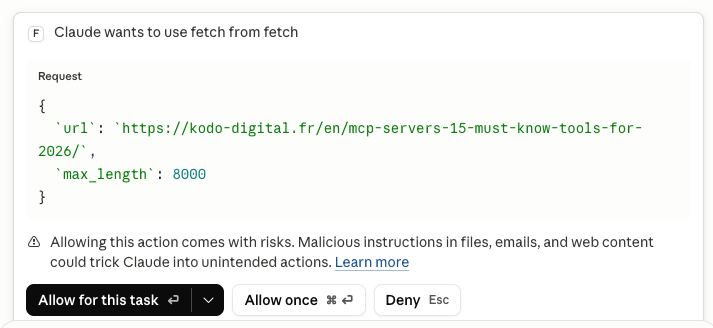
Fetch retrieves the content of a web page and converts it to Markdown. Below, a prompt that triggers the Fetch tool and also asks Claude Desktop to show the JSON-RPC calls it made. Note the explicit reference to the tool name, which prevents Claude Desktop from using its built-in web browsing capability instead of our Fetch server (“Using the Fetch tool, …”):
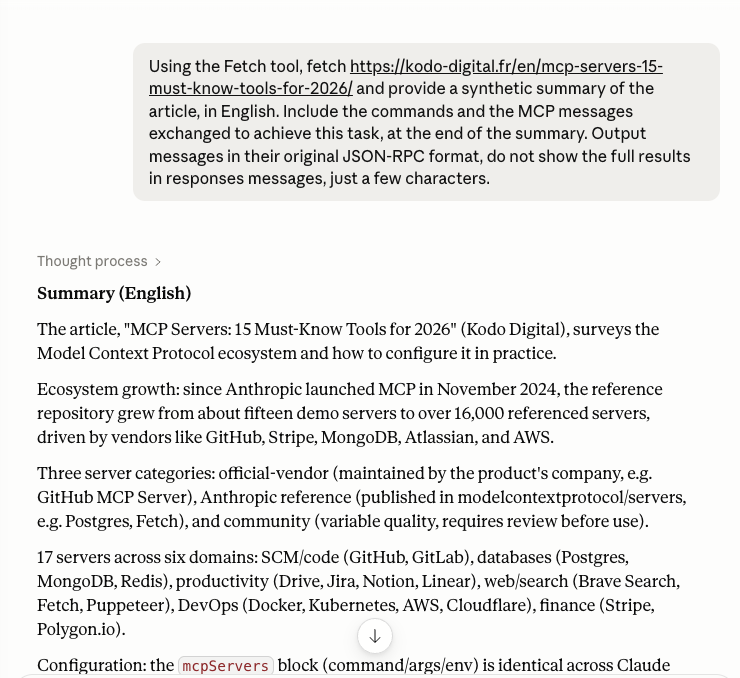
Further along, Claude displays the JSON-RPC messages exchanged. The Fetch tool retrieves 5000 characters by default, so the LLM makes several successive calls to retrieve the full page content:
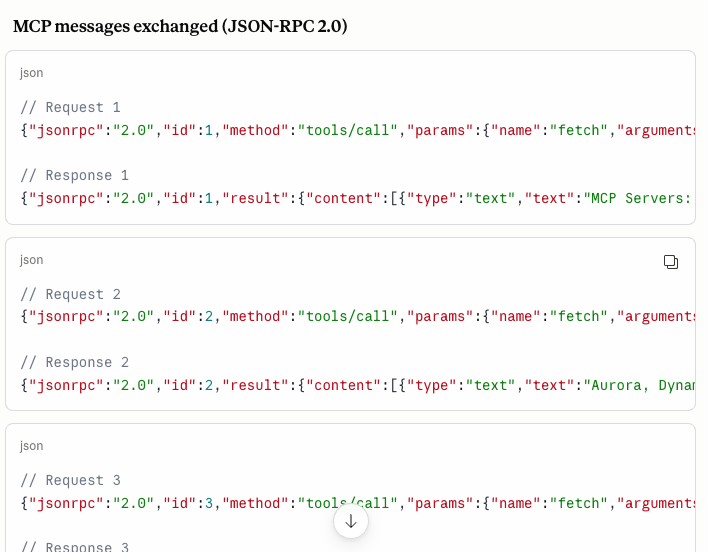
More information on Fetch is available in the GitHub repository: https://github.com/modelcontextprotocol/servers/tree/main/src/fetch, including the full tool parameters:
fetch– Fetches a URL from the internet and extracts its contents as markdown.url(string, required): URL to fetchmax_length(integer, optional): Maximum number of characters to return (default: 5000)start_index(integer, optional): Start content from this character index (default: 0)raw(boolean, optional): Get raw content without markdown conversion (default: false)
How do you configure MCP in Gemini CLI?
Gemini CLI, Google’s open-source command-line AI tool released in 2026, supports MCP natively. Its configuration lives in ~/.gemini/settings.json, applied globally to all Gemini CLI sessions. The mcpServers block format is identical to Claude Desktop:
{
  "mcpServers": {
    "github": {
      "command": "npx",
      "args": ["-y", "@github/github-mcp-server"],
      "env": {
        "GITHUB_PERSONAL_ACCESS_TOKEN": "ghp_YourTokenHere"
      }
    },
    "fetch": {
      "command": "uvx",
      "args": ["mcp-server-fetch"]
    }
  }
}
This format convergence is a direct consequence of MCP standardization. The same configuration block works with Claude Desktop, Claude Code CLI, and Gemini CLI — only the file path changes. In practice, if you work with both clients daily, maintaining the same server set in both configurations is straightforward.
A few practical differences worth knowing: Gemini CLI does not hot-reload MCP servers. If you modify settings.json, restart Gemini CLI for the changes to take effect. Gemini CLI also gives explicit visual feedback when it calls an MCP tool — tool name, arguments, success or failure — which makes debugging misbehaving servers easier. For servers that rely on OS-specific environment variables (PATH, HOME), the shell you use to launch Gemini CLI may affect how those servers start.
Example: Gemini CLI / Playwright
In this example, Playwright is configured using an entry similar to the one shown below:
"playwright": {
   "command": "npx",
   "args": [
    "-y",
    "@playwright/mcp@latest"
  ]
}
Once Gemini CLI is restarted, the /mcp list command should list your MCP server:
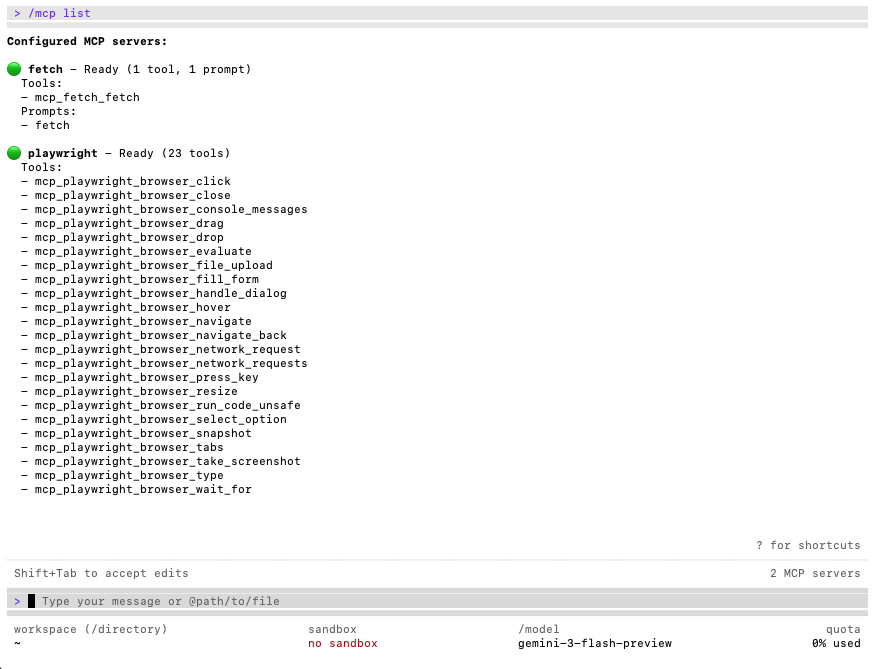
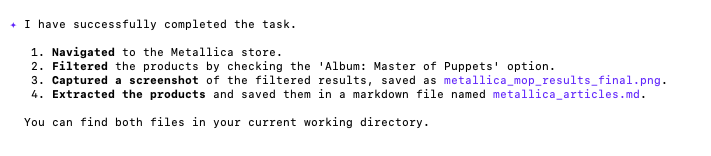
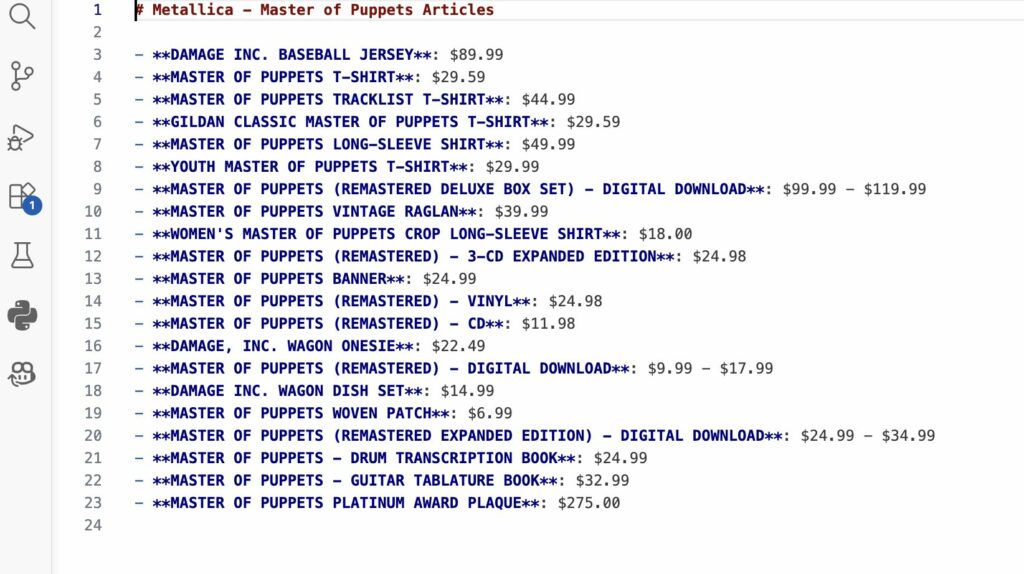
In this example, we navigate to an online shop, apply a filter, take a screenshot, and export the product listing to a Markdown file:

Results at the end of execution:
Generated Markdown file:
Community directories: useful, but unvetted
Three platforms concentrate MCP server discovery in 2026. mcpservers.org mirrors the awesome-mcp-servers list on GitHub: over 450 curated servers with descriptions, implementation languages, and repository links, organized by category. mcpmarket.com publishes daily rankings by community engagement and GitHub stars, with a top-100 leaderboard updated every day — useful for spotting servers gaining traction. mcp.so is a community-driven sharing platform, more oriented toward informal discovery than structured evaluation.
These directories are useful starting points, but none of them verify the security of the code. Anyone can submit a server to mcpservers.org or mcpmarket.com. Installing a community MCP server without reviewing the source code means running third-party unknown code with your user account’s permissions: full access to the local filesystem, network, and your environment variables and API keys. Popularity — GitHub stars, download counts — is a trust signal, not a security guarantee. Article 4 of the MCP-101 series covers these risks systematically, with real-world attack case studies documented by security researchers at Invariant Labs, Wiz, and Trail of Bits.
Before installing any community server, run through this checklist:
- Active GitHub repo: last commit within the past six months, issues answered by an identified maintainer.
- Maintainer history: a GitHub profile with prior contributions, not an account created last week with a single repository.
- Stars and forks: 100+ stars is a reasonable threshold for a general-purpose server.
- Read the main source file: look for network calls to unknown domains and filesystem access not justified by the server’s stated purpose.
- Least privilege: a web search server has no business reading
~/.sshor.env. If the code does that, it is not the right server.
FAQ
What is the difference between a vendor-official server and an Anthropic reference server?
A vendor-official server is maintained by the company that makes the product: MongoDB Inc. for the MongoDB MCP, Atlassian for the Jira MCP. Support and compatibility guarantees come from the product vendor. An Anthropic reference server is published in modelcontextprotocol/servers and covers generic functionality (Postgres, Fetch, filesystem): the code is auditable and maintained by Anthropic, but Anthropic does not make Postgres or Brave. Both are trustworthy, but for different reasons.
Do all MCP clients use the same configuration format?
The mcpServers block with command, args, and env fields is standardized and works identically in Claude Desktop, Claude Code CLI, and Gemini CLI. What differs between clients is the file path and how to reload servers after a configuration change. This convergence is precisely the benefit of MCP: a server written once is reusable across all compliant clients.
Is the Fetch server safe to use if its code comes from Anthropic?
The Fetch server’s code is clean and auditable in modelcontextprotocol/servers. The risk comes from the content it returns, not from the server code itself. A fetched web page can contain instructions designed to manipulate the LLM through the returned data — this is prompt injection via retrieved content. The practical rule: use Fetch only on URLs you control or whose provenance you trust. Do not let an autonomous agent call Fetch on arbitrary user-supplied URLs without human oversight.
Can I declare the same MCP servers in both Claude Desktop and Claude Code CLI?
Yes, and that is the standard setup. Claude Desktop reads claude_desktop_config.json; Claude Code CLI reads .claude/settings.local.json (local scope) or ~/.claude.json (user scope). The two configurations are fully independent. A server declared for Claude Desktop is not visible in Claude Code CLI unless you also register it there. Use claude mcp list to check which servers are active in the current Claude Code session.
Should I prefer uvx or npx to start an MCP server?
Both download and run a package at runtime. Use uvx for Python servers (PyPI packages), npx for JavaScript servers (npm packages). The same precautions apply to both: verify the exact package name, the publisher, and the repository history before adding the line to your config. A safer alternative for production or team environments: install the package into a dedicated virtualenv or Docker container rather than downloading on every server start — this gives you a fixed, auditable version that does not change between restarts.
Conclusion — an ecosystem still accelerating
The MCP ecosystem in 2026 rests on a coherent combination: an open protocol, major vendors who recognized the value of investing in official servers, and a community filling in the gaps. GitHub, MongoDB, Atlassian, Stripe, AWS, Cloudflare, Notion: services that together cover most of a web developer’s stack have all shipped MCP integrations. Declaring them in Claude Desktop or Gemini CLI takes about ten lines of JSON.
The key takeaway from this panorama: a server’s type determines the initial level of trust you can extend to it. A vendor-official server comes with the product company’s support and update cycle. An Anthropic reference server provides auditable code for common generic use cases. A community server may be excellent — hundreds of them are — but it requires a quick source review before you let it run under your user account permissions. Not paranoia: just the same due diligence you would apply to any third-party dependency.
Next in the MCP-101 series: Article 3 introduces the SDKs and frameworks available for building your own servers (Python with FastMCP, TypeScript, and Go). Article 4 is the most strategically important one to read before writing any server code: it covers real documented MCP attack vectors, from tool poisoning to silent data exfiltration, with concrete countermeasures. Also worth reading: our article on the MCP 2026-07-28 spec, which documents the protocol changes affecting all servers before July 2026, and our A2A vs MCP comparison for understanding how MCP fits into a multi-agent architecture alongside Google A2A.